
CSA Accessibility Home Checker App
The CSA Accessibility Home Checker App is an innovative tool designed to help homeowners, renters, builders, and real estate professionals evaluate and improve the accessibility of living spaces. Using AI-powered image recognition, the app allows users to scan and assess any living space, providing personalized recommendations based on accessibility standards such as the CSA B652 – Accessible Private Homes of Canada. Built to bridge the gap between regulations and real-world applications, the app empowers users to create barrier-free, inclusive homes for everyone.
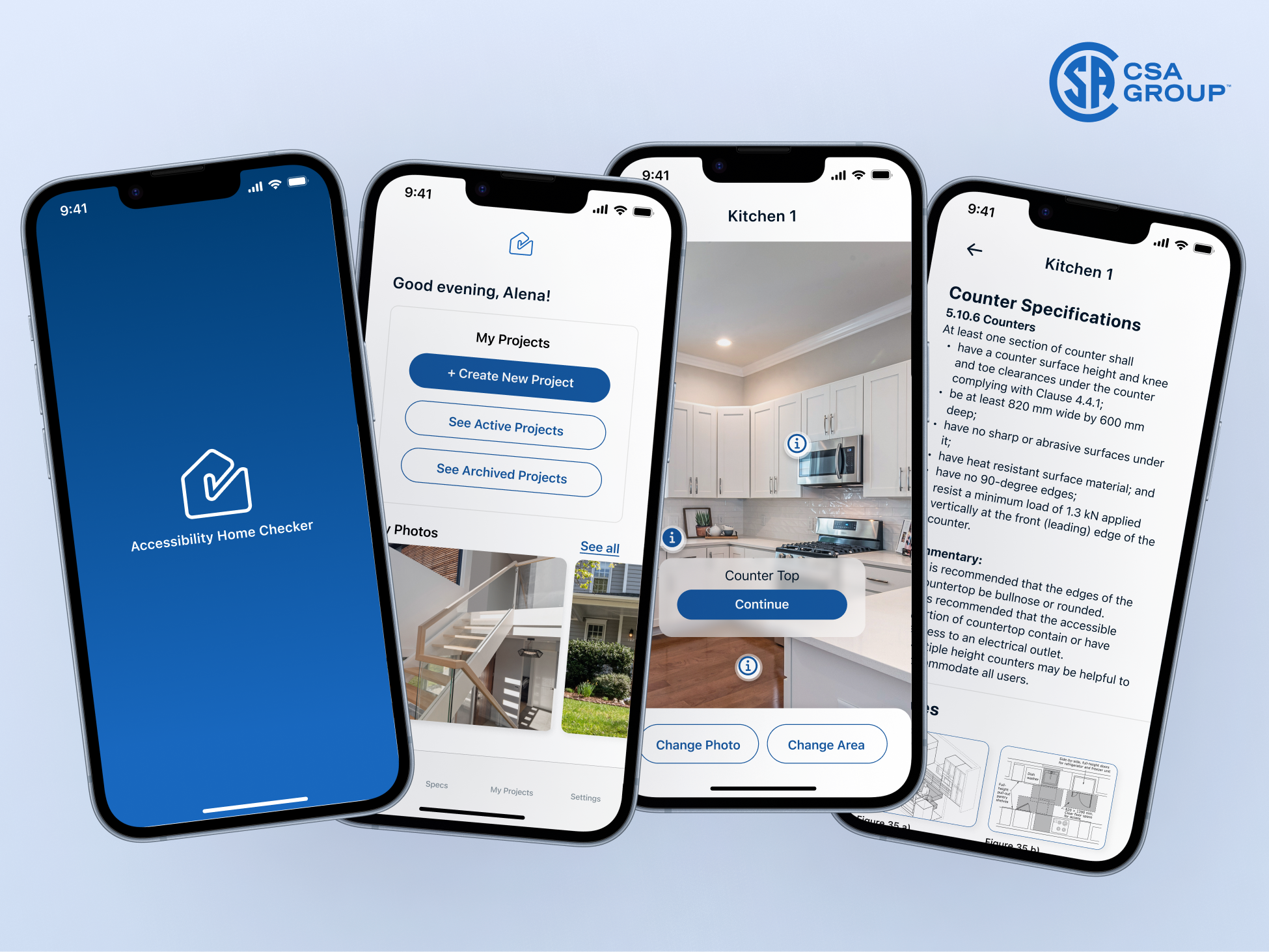
Breaking Barriers: The Urgent Need for Accessible Living Spaces in Canada
In Canada, 6.2 million people (22% of the population) live with a disability, and this number is rising due to an aging population. Despite this, many homes were built before accessibility standards existed, making modifications costly and complex. People with disabilities face higher risks of social isolation due to inaccessible housing, yet accessibility upgrades can add as little as 1% to construction costs.
The real estate and construction industries lack standardized guidance, leaving homebuyers, builders, and renters struggling to assess and implement accessibility improvements. To address this gap, the federal government has pledged $30 billion over 10 years to improve housing accessibility—but there’s still a critical need for easy, AI-powered tools to make homes truly inclusive.
In this Case Study you will find the following sections:
- How might we?/Personas
- Key Features with UI Screens
- My Role as a Design Lead
- Technical Findings & Next Steps
Project Background:
The CSA Accessibility Home Checker App was developed in alignment with the CSA B652 – Accessible Private Homes standard to help define and implement accessibility requirements in residential spaces. As accessibility needs continue to grow, there is a clear demand for a user-friendly tool that enables homeowners, renters, and professionals to evaluate and modify spaces with ease.
This initiative aimed to bridge the knowledge gap in accessibility standards by leveraging mobile technology to simplify accessibility assessments. The project’s proof of concept (PoC) validated the feasibility of using image recognition and user-friendly interfaces to enable barrier-free living
Project Scope:
The project followed a structured Discovery & Design phase, which included:
- User Research: Developing user personas and journeys through primary and secondary research.
- Wireframing & UI/UX Design: Creating accessible wireframes, user flows, and an intuitive interface.
- Prototyping & Testing: Developing a clickable prototype to validate user experience and usability.
How might we empower homeowners, renters, and professionals to easily conduct AI-powered accessibility assessments of a living space and receive clear, actionable guidance for improving home accessibility?
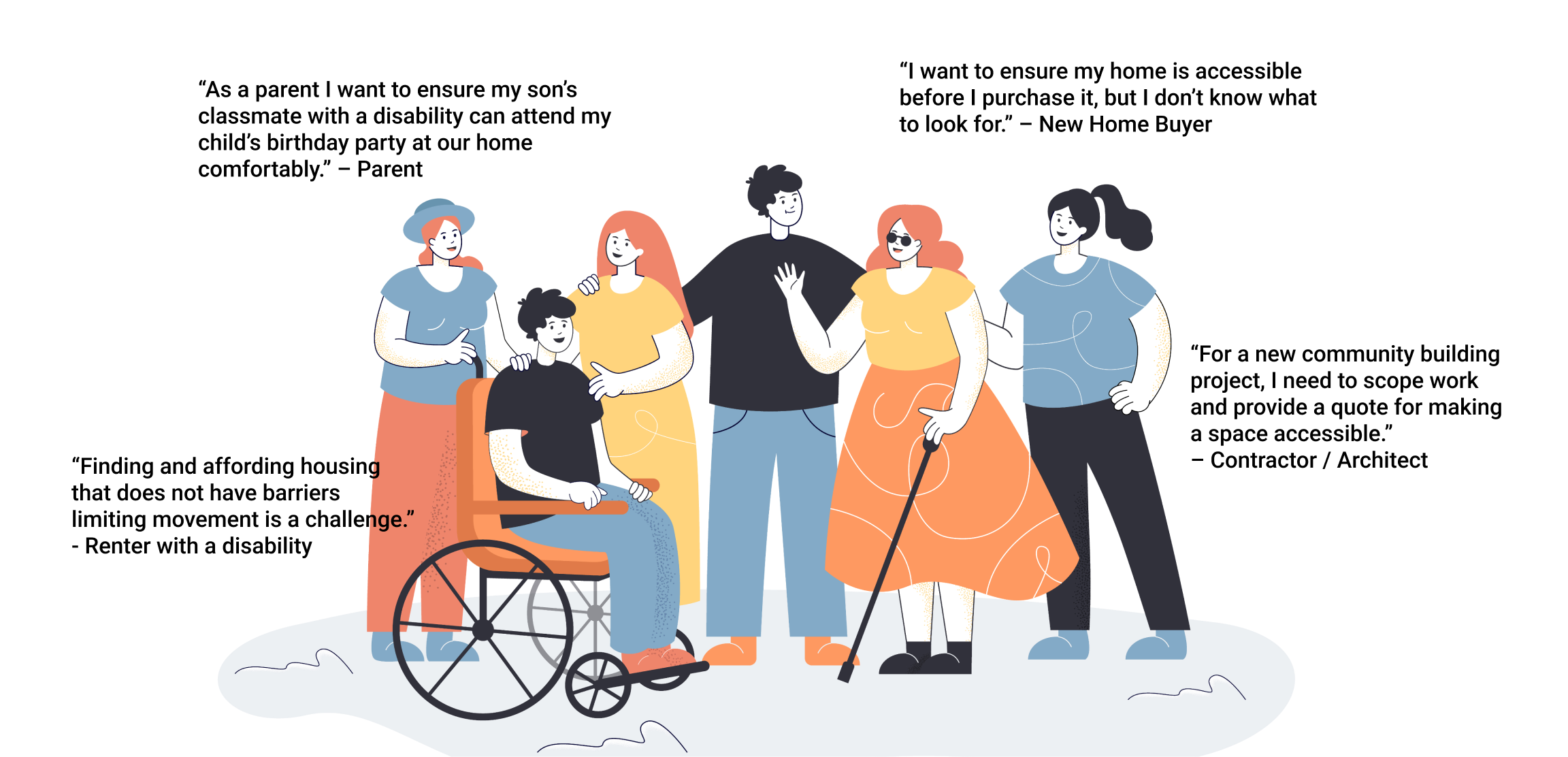
Key Features: Turning Research into Actionable Design
User research revealed that accessibility assessments were often overwhelming, time-consuming, and difficult to interpret. Many users struggled with identifying key accessibility elements, understanding technical standards, and keeping track of their evaluations.
To solve these challenges, the CSA Accessibility Home Checker App was designed with AI-powered automation, structured guidance, and flexible organization tools. Each feature directly addresses a specific user pain point and is designed based on a unique accessibility principle, ensuring accessibility evaluations are intuitive, accurate, and easy to manage.
Key Features:
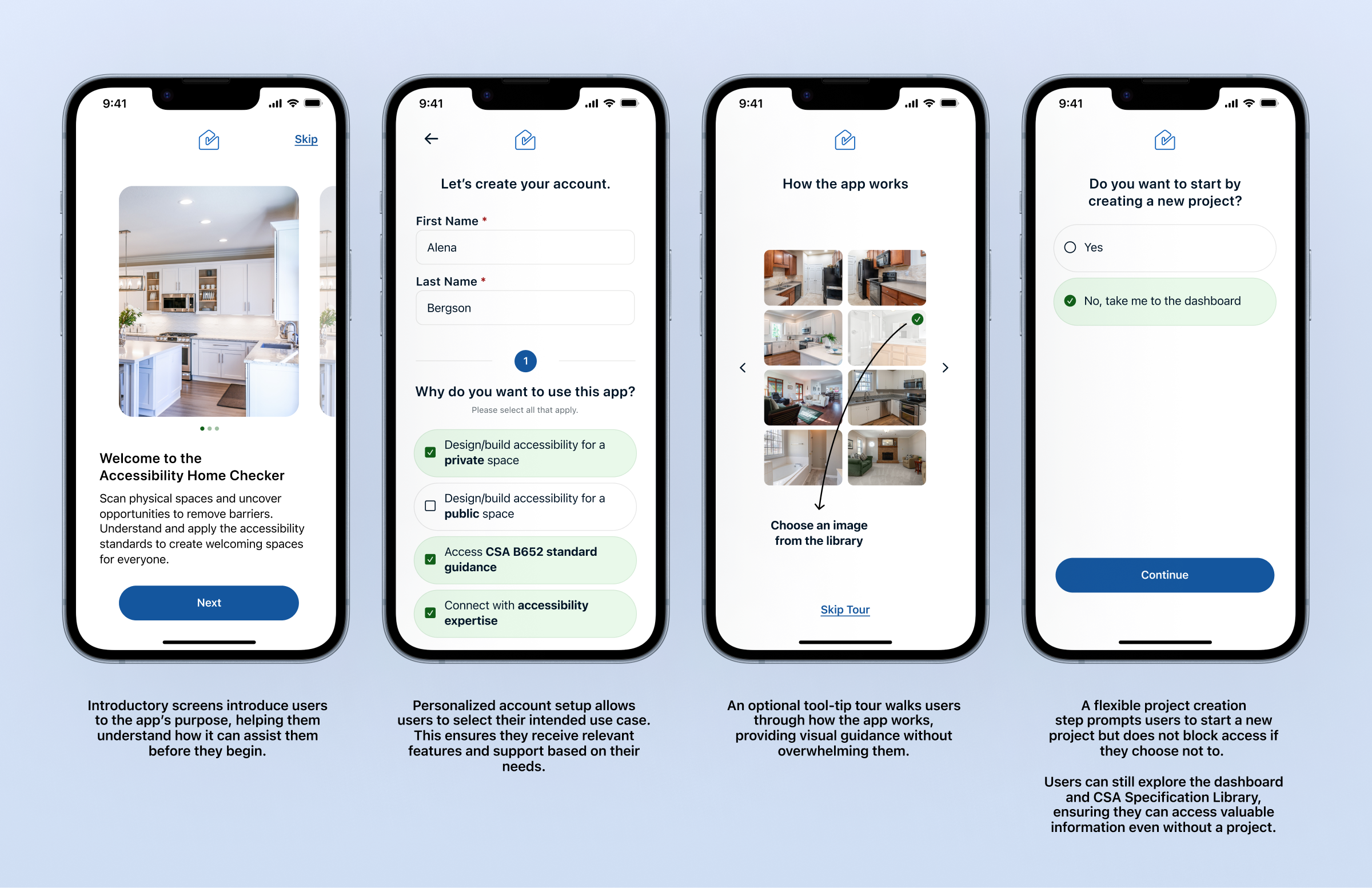
Guided Onboarding & Flexible Signup Process
- Problem: A well-designed onboarding experience is critical for accessibility and user engagement, especially for users unfamiliar with accessibility standards or the app's functionality. Without a structured introduction, new users may struggle to understand the app’s capabilities, where to start, or how it applies to their needs. Additionally, some users may want to explore resources before committing to a project, so restricting access until a project is created could create unnecessary friction.
- Solution: The onboarding and signup flow was designed to be informative yet flexible, ensuring all users feel supported without being forced into a rigid workflow. It includes introductory screens, personalized account setup, and an optional tool-tip tour for easy navigation. Users can skip project creation and still access the CSA Specification Library and dashboard, ensuring they engage with the app at their own pace.
- Research Insight: User research highlighted that many first-time users of accessibility tools need guidance but also flexibility. Some users want to dive straight into scanning, while others prefer browsing specifications first.
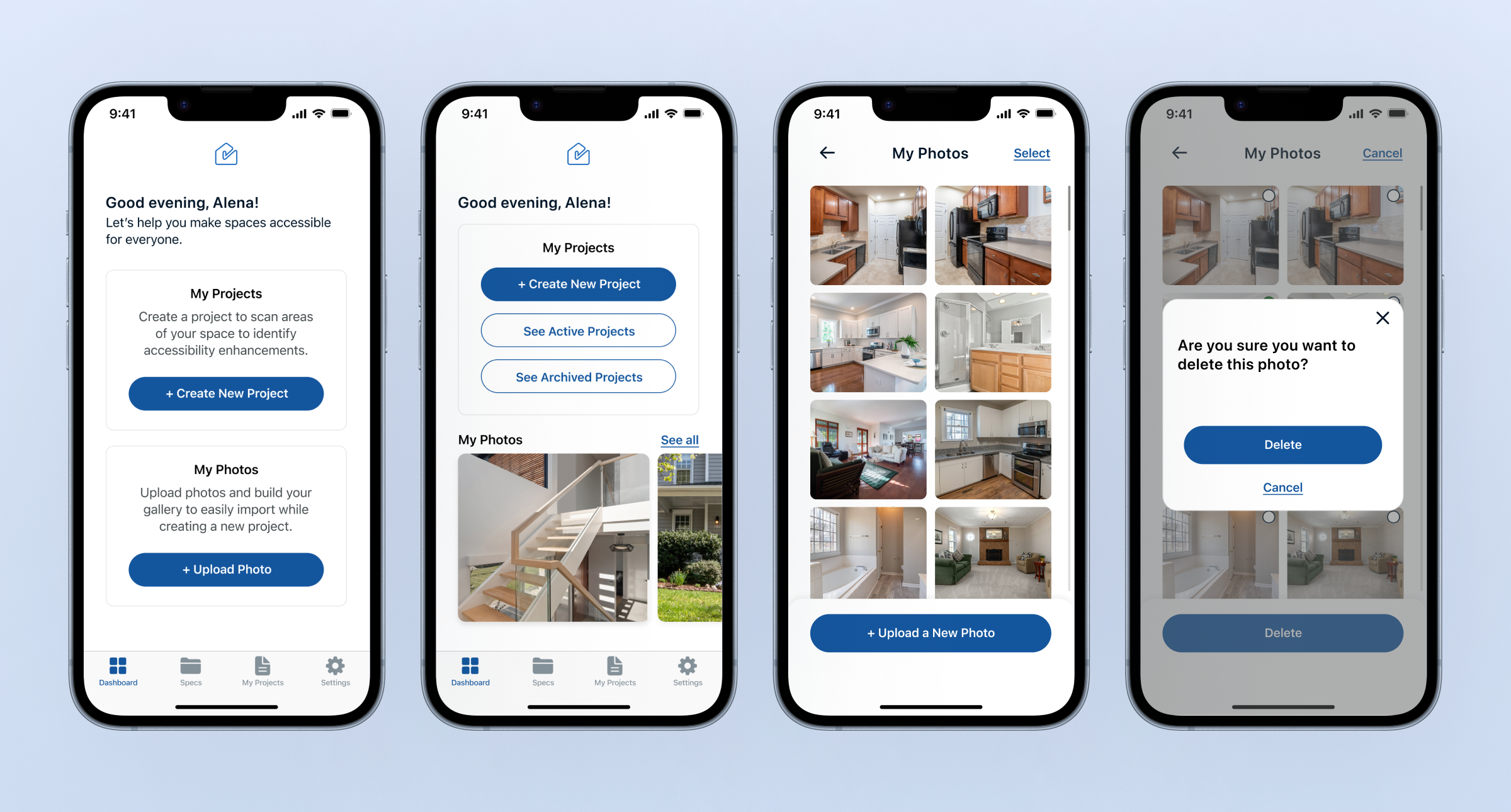
Organized Dashboard & In-App Image Library
- Problem: Users needed a centralized space to manage accessibility assessments and store relevant images separately from their phone’s gallery. Without an organized system, accessibility-related photos could get lost or forgotten, making it harder to track spaces that still need evaluation.
- Solution: The dashboard adapts to user needs, guiding first-time users while providing quick access to projects for returning users. The in-app image library allows users to upload, store, and manage accessibility-related photos separately, ensuring they remain organized and easy to retrieve. Users can also add or delete images as needed, keeping their workspace efficient.
- Research Insight: Users often forgot which images needed assessment when mixed with personal photos. By offering a dedicated image library, the app ensures accessibility-related visuals remain organized, accessible, and ready for evaluation at any time.
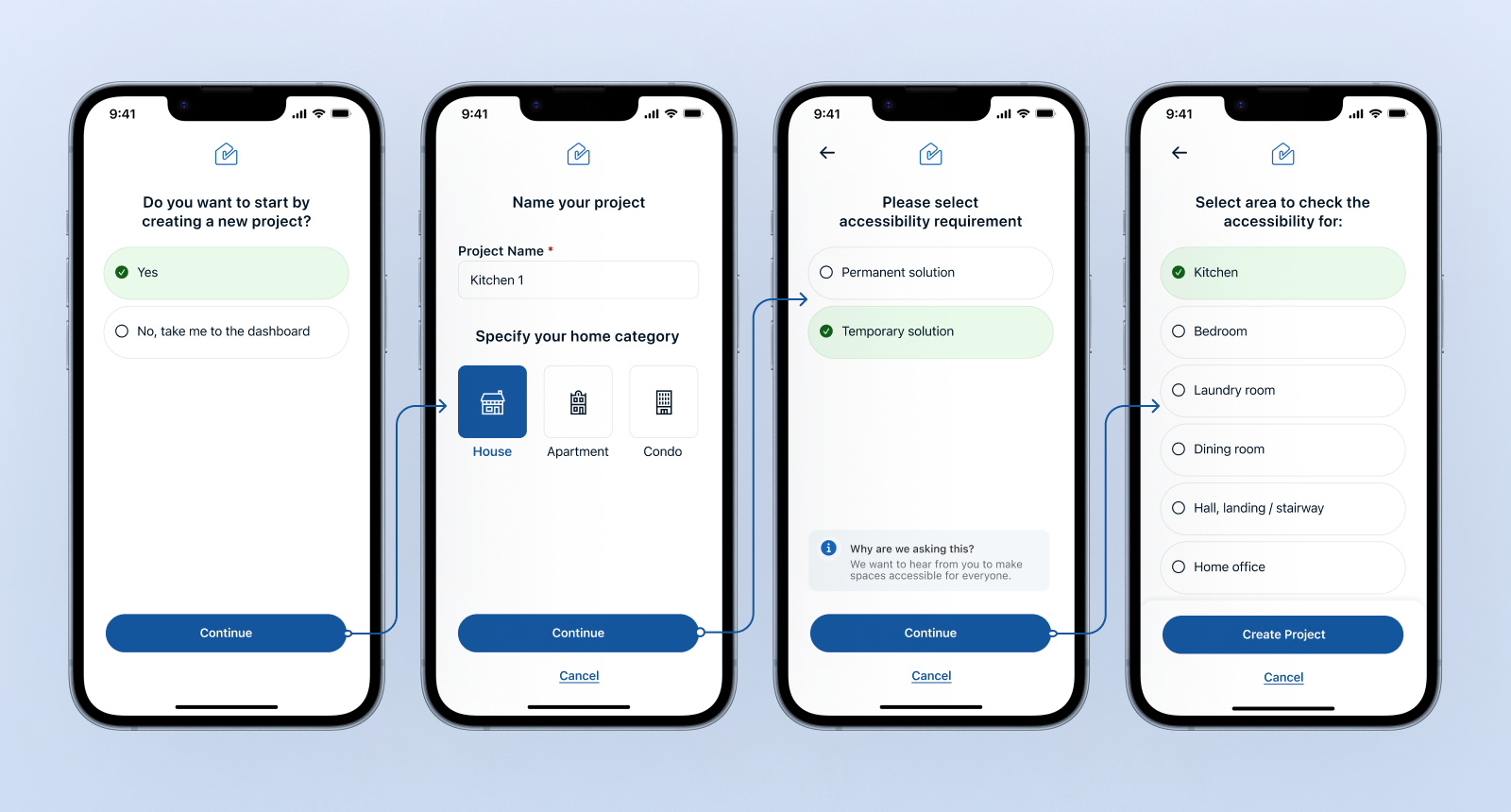
Create a New Project
- Problem: Users evaluating multiple spaces - whether homeowners planning renovations, property managers overseeing multiple units, or builders working on different projects—needed a way to organize and track their accessibility assessments. Without a structured system, keeping records of different evaluations became overwhelming and difficult to manage. Many also needed a way to differentiate between temporary and permanent accessibility solutions but struggled to categorize their projects effectively.
- Solution: To streamline project management, we introduced a "Create a New Project" feature that allows users to name their project, choose a category such as house, apartment, or condo, and specify whether the accessibility requirement is permanent or temporary. Users can also define the area they are assessing, such as a kitchen, bedroom, laundry room, or dining space.
- Research Insight: Our research showed that users often assess multiple areas separately and need a structured way to keep track of modifications. By making project creation simple and intuitive, we ensured that users can manage their accessibility improvements in a clear, organized, and efficient way.
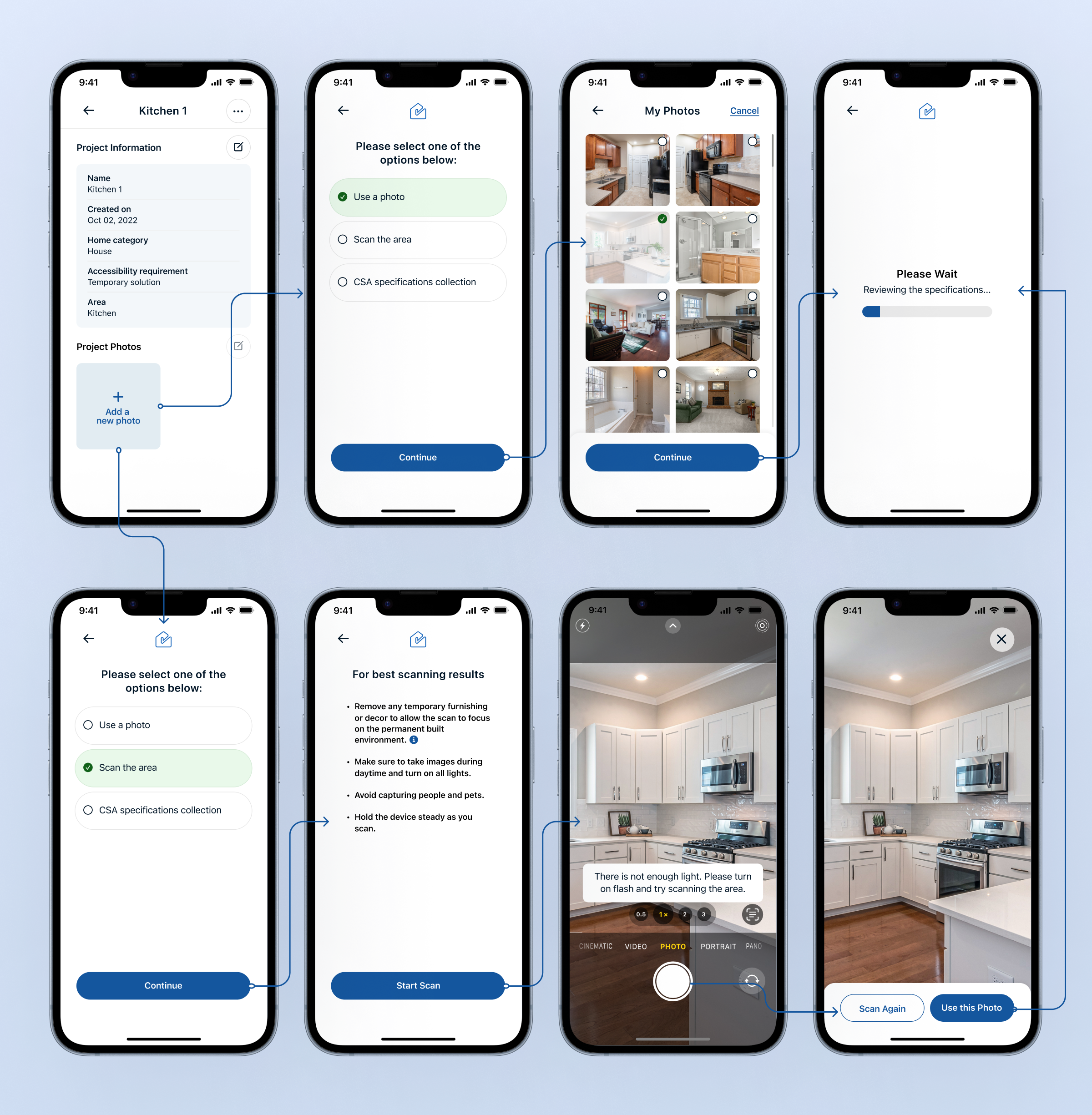
Upload or Scan to Review Specifications
- Problem: Users needed a fast and accurate way to assess accessibility in a space, but manually referencing standards and taking measurements was time-consuming and complex. Builders, homeowners, and renters often struggled to match accessibility guidelines with real-world spaces, leading to incomplete or inaccurate modifications. Additionally, lighting conditions, clutter, and scanning angles could impact the effectiveness of AI-powered assessments.
- Solution: This feature allows users to either upload an existing photo from their gallery or scan an area in real-time using their device’s camera. Before scanning, users receive best practice tips, such as improving lighting and reducing clutter, to ensure higher accuracy. If the system detects poor lighting, it prompts the user to turn on the flash or adjust their environment. Once an image is selected or captured, the app automatically analyzes the space and retrieves relevant CSA accessibility specifications for review.
- Research Insight: Our research found that users wanted a flexible, guided way to assess accessibility without requiring technical expertise. Some preferred uploading photos from their gallery, while others needed a real-time scanning option for more precise evaluations. The guided scanning experience ensures users capture clear, high-quality images, leading to more reliable accessibility assessments.
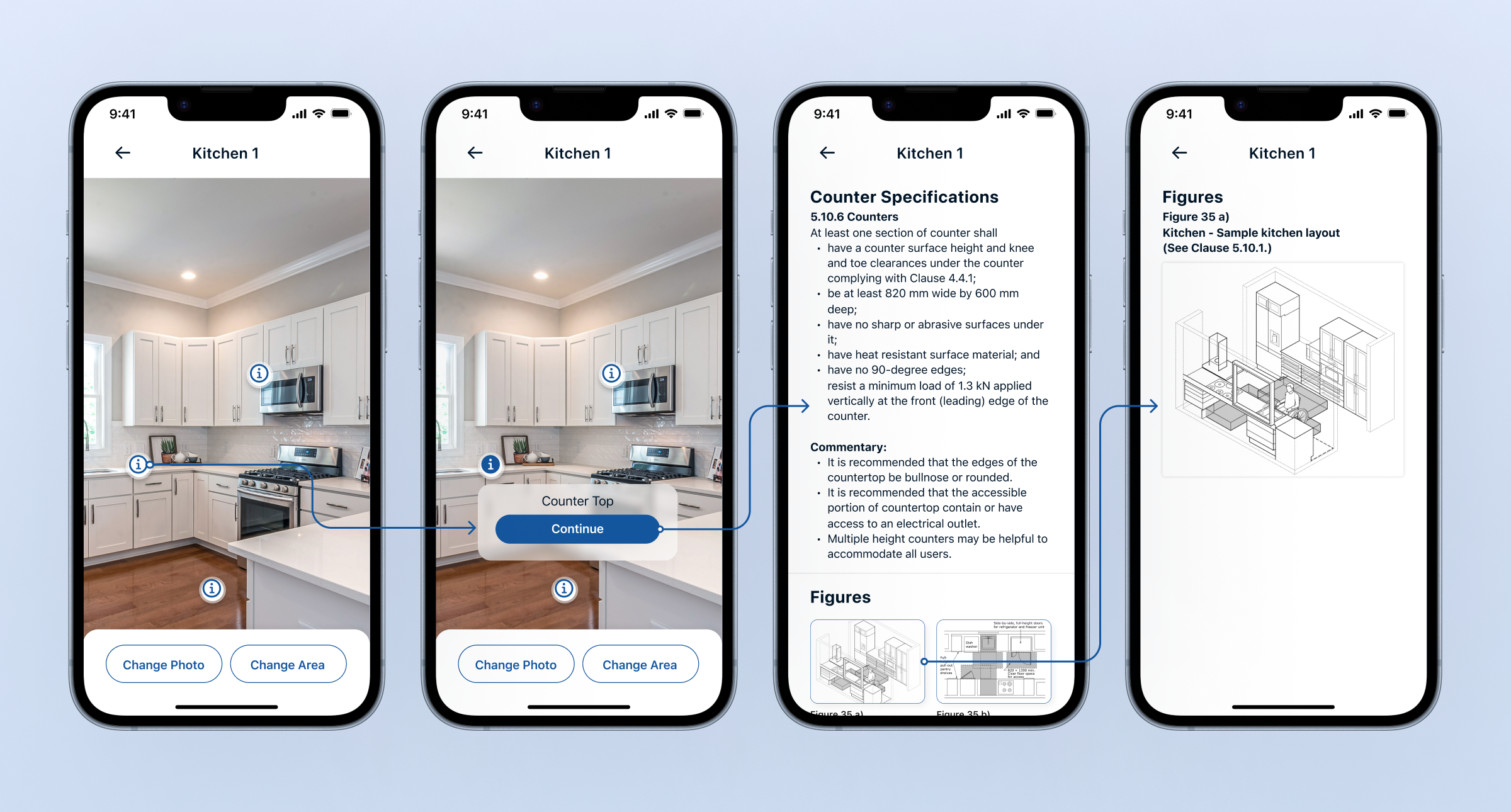
AI-Powered Image Recognition for Accessibility Assessments
- Problem: Many users - especially homeowners and individuals without technical expertise—struggled to identify key accessibility elements in their space or understand which specifications applied to them.
- Solution: The AI-powered image recognition system automates the identification of key elements within a scanned or uploaded image. Once the system processes the image, it highlights interactive markers over identified areas (e.g., countertops, doorways, sinks). Users can click on these markers to see the name of the element and its corresponding accessibility specifications based on CSA standards. The app then provides detailed accessibility guidelines, recommended dimensions, material requirements, and compliance notes, making it easier for users to evaluate their space without needing technical knowledge.
- Research Insight: Our research found that users needed a way to bridge the gap between accessibility regulations and real-world application. Many homeowners were unfamiliar with which elements in their space needed modifications or how to interpret accessibility requirements. By integrating AI-powered image recognition, this feature removes guesswork, simplifies the process, and makes accessibility assessments more intuitive and actionable.
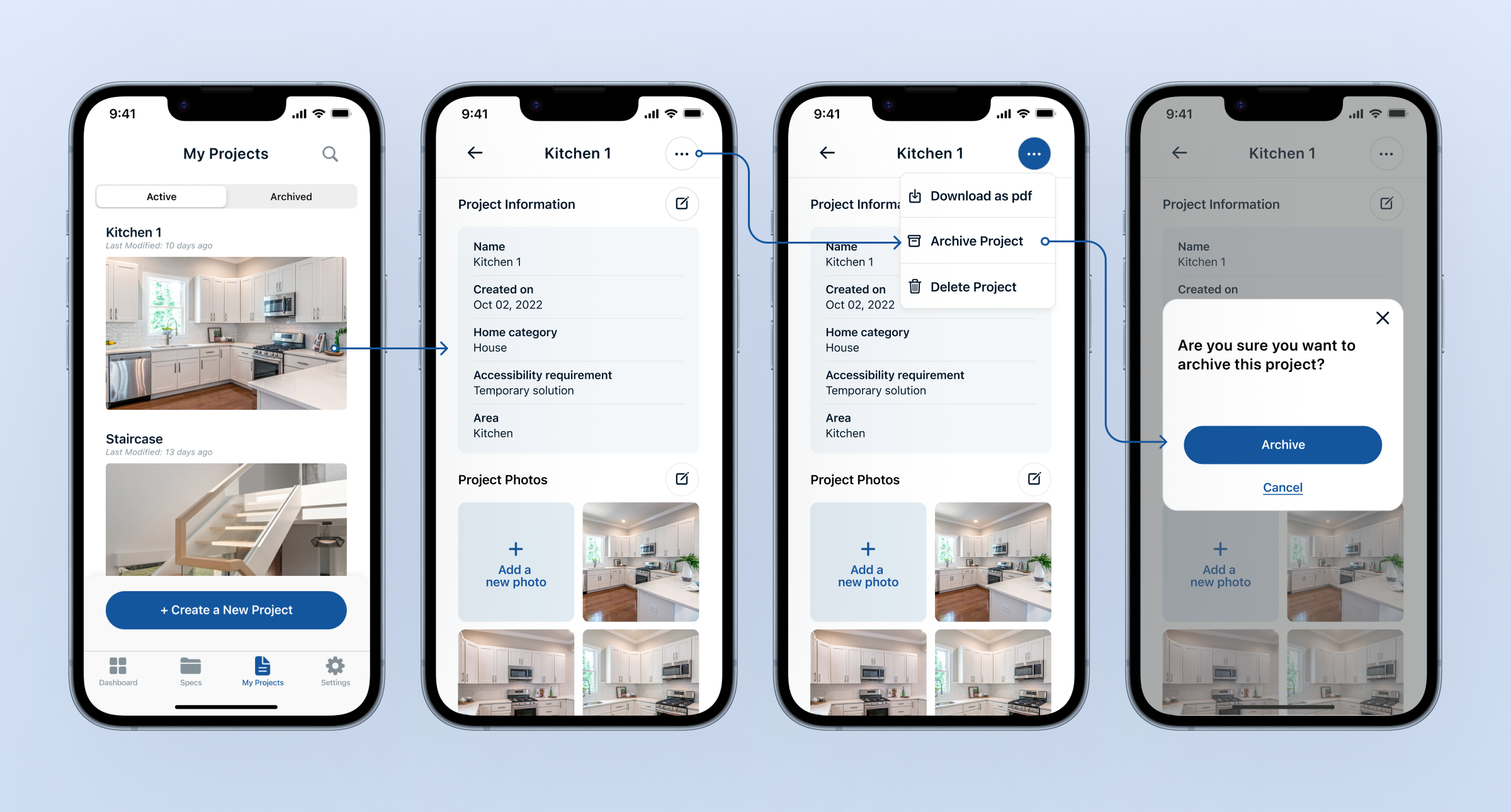
My Projects – Organizing Accessibility Assessments
- Problem: Users needed a way to store, manage, and revisit their accessibility assessments without losing track of their work. Whether assessing multiple spaces over time or working on phased modifications, keeping projects organized and accessible was essential. Without a structured system, past evaluations could get lost, and users might feel forced to delete completed projects to reduce clutter.
- Solution: The My Projects feature allows users to create, store, and manage multiple accessibility assessments in one place. Active projects remain easily accessible, while past projects can be archived instead of deleted, ensuring a clean, organized workspace. Users can unarchive projects at any time, allowing them to reference or continue previous assessments when needed. This effectively creates a portfolio of accessibility evaluations, giving users long-term access to their past assessments.
- Research Insight: Our research revealed that homeowners, builders, and property managers often revisit past projects for future renovations or compliance checks. By providing a structured way to keep, archive, and restore projects, this feature ensures that users can track accessibility improvements over time, reducing repetitive assessments and enhancing workflow efficiency.
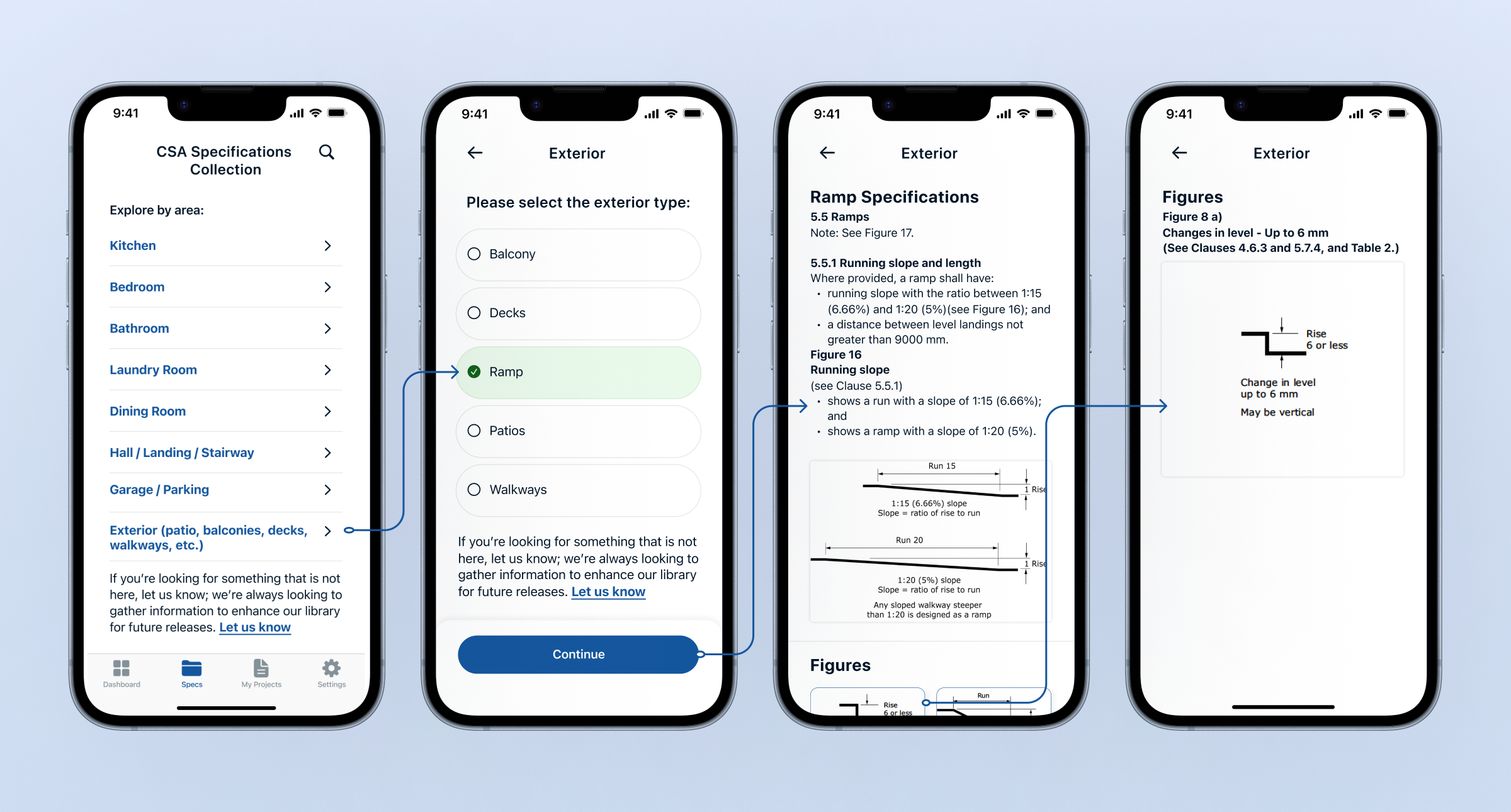
CSA Specification Library
- Problem: Not all users want or need to scan a space or upload images to evaluate accessibility. Many builders, architects, and professionals require direct access to structured accessibility standards without going through an assessment process. However, accessibility guidelines are often buried in complex documents, making them difficult to navigate and interpret.
- Solution: To address this, we integrated a CSA Specification Library, allowing users to browse accessibility standards by space type and element (e.g., Exterior → Ramp). This provides quick, structured access to specifications, including text descriptions, zoomable visuals, and reference images.
- Research Insight: This design choice was driven by our research, where builders and industry professionals expressed the need for a centralized, easy-to-navigate repository of accessibility guidelines to streamline planning and compliance efforts.
My Role as Design Lead: Demonstrating Deep Expertise in Accessibility-first Design
- Beyond designing for compliance, I focused on inclusive UX/UI decisions to make the app usable for everyone. Ensured the app met Web Content Accessibility Guidelines (WCAG 2.1 AA) by incorporating color contrast, readable text.
- Small yet impactful features – such as adjustable font sizes for better readability and a dark mode for improved contrast – were integrated to accommodate visual and cognitive accessibility needs.
- Every feature was carefully tied to core accessibility principles, ensuring that usability was not an afterthought but a foundational aspect of the design.
- Delivering a successful proof of concept (PoC) was critical, as the final deliverable was a prototype for the CSA team to present to leadership to secure funding. This meant that the solution had to be more than just a good idea on paper—it had to be practical, intuitive, and valuable to real users.
- Every design decision was made with this in mind, ensuring that the app was not only innovative but also functional, inclusive, and impactful.
